An open-source markup language called MJML was created especially to make the process of creating responsive HTML email templates easier. It has always been difficult and time-consuming to create emails that look similar across dozens of email programmes, including Gmail, Outlook, Apple Mail, and others. This issue is resolved by MJML, which offers a straightforward, semantic syntax that automatically translates into clear, responsive HTML.
MJML simplifies the intricacies of HTML emails. Rather than handling tables, inline styles, and various client-specific solutions, developers create email designs with intuitive MJML tags like ‘<mj-section>’, ‘<mj-column>’, ‘<mj-text>’, and ‘<mj-image>’. The MJML engine subsequently translates this code into optimised HTML that functions consistently across different email clients.
One of the biggest advantages of MJML is that responsiveness is built in by default. Emails created with MJML automatically adapt to different screen sizes without requiring media queries.
Why Use MJML for Email Templates?
- Responsive by default: Mobile-friendly layouts without extra effort
- Cross-client compatibility: Handles quirks of Outlook and other email clients
- Cleaner code: Readable markup that’s easier to maintain
- Faster development: Focus on design and content, not HTML hacks
Easy Steps to Create a Responsive HTML Email Using MJML
- Install or Access MJML
You can use MJML in multiple ways:- Install via npm ( ‘npm install -g mjml’ )
- Use the MJML desktop application
- Use the online MJML live editor
- Create the Basic MJML Structure
Every MJML file starts with ‘<mjml>’, ‘<mj-head>’, and ‘<mj-body>’. The head is used for fonts, styles, and preview text, while the body contains your email content.
- Build Layout with Sections and Columns
Use ‘<mj-section>’ to define horizontal blocks and ‘<mj-column>’ to create columns inside them. This grid-based system ensures your layout adapts well on mobile devices.
- Add Content Elements
Insert text, images, and buttons using components like:
- ‘<mj-text>’ for paragraphs and headings
- ‘<mj-image>’ for images
- ‘<mj-button>’ for call-to-action buttons
MJML automatically applies inline styles and responsive behavior.
- Customize Styling
You can control padding, background colors, fonts, and alignment directly on MJML components. Global styles can also be defined in ‘<mj-head>’ for consistency.
- Compile to HTML
Once your MJML template is ready, compile it into HTML using the MJML CLI, desktop app, or editor. The output HTML is ready to be used in any email marketing platform.
Smart Web Agency MJML Templates
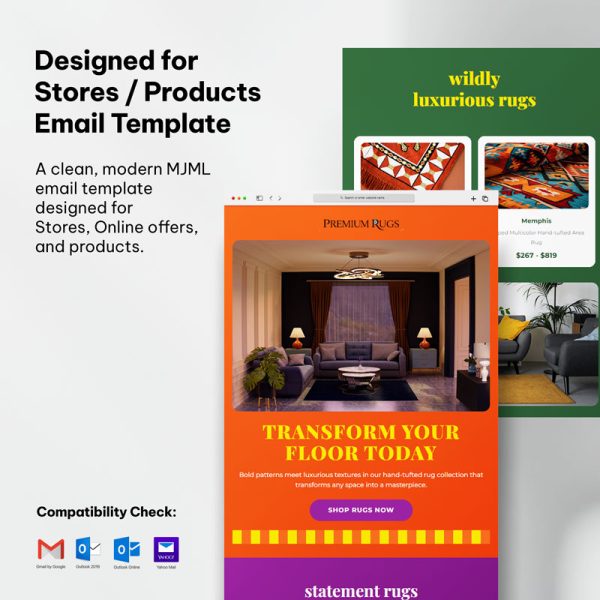
2. MJML Email Products Template
3. MJML Email Charity Template

4. MJML Email Sale Campaign Template

5. MJML Email eCommerce Template


7.MJML Email Corporate Template

Conclusion
MJML simplifies the process of developing responsive email templates for all users, ranging from novices to seasoned developers. By eliminating the intricacies associated with conventional HTML emails, MJML enables the swift and dependable creation of professional, responsive templates. For those who frequently design email campaigns, MJML represents a valuable tool that merits consideration.
Frequently Asked Questions (FAQs)
1. What is MJML?
MJML (Mailjet Markup Language) is an open-source framework designed to simplify the creation of responsive email templates. It abstracts complex HTML email coding into easy-to-use components.
2. Who should use MJML?
MJML is ideal for beginners, marketers, designers, and experienced developers who regularly create email campaigns and want faster, more reliable results across email clients.
3. Does MJML support responsive email design?
Yes. Responsiveness is built into MJML by default. It automatically adapts email layouts for desktop, tablet, and mobile devices without extra coding.
4. Can MJML work with existing email marketing platforms?
Yes. MJML-generated HTML can be exported and used with most email marketing tools such as Mailchimp, HubSpot, SendGrid, and custom ESPs.
5. Do I need to know HTML or CSS to use MJML?
Basic HTML knowledge is helpful, but not required. MJML uses a simple, readable syntax that makes email development easier than traditional HTML emails.
6. Is MJML compatible with all email clients?
MJML is designed to support major email clients including Gmail, Outlook, Apple Mail, and Yahoo. It handles many client-specific limitations automatically.