Many eCommerce store owners struggle to offer subscription products with instalment payments in WooCommerce. We faced the same issue while building a site that needed customers to pay their subscription cost in manageable monthly instalments.
Like many developers, we initially turned to existing plugins such as SUMO Payment Plans. However, it caused serious conflicts, including duplicate orders and renewal mismatches. This lack of control made me realise that a custom-built solution would be more reliable and easier to maintain.
So, we built my own lightweight plugin: WC Subscription Instalments Control
This plugin provides complete control over WooCommerce subscription payments made in instalments—without added complexity or costly licences..
The Problem
By default, WooCommerce Subscriptions allows users to create recurring payments for products. However, if you want to break a total cost into multiple monthly instalments while keeping control over shipping and renewal orders, it gets tricky.
In our case, the challenge was:
- Tracking how many instalments were completed
- Ensuring only the first instalment triggered a shipping order
- Marking the following payments as Balance Payable (no shipping required)
- Displaying clear parent and child relationships in the WooCommerce order list
The goal was to make this process automatic and completely transparent to both store owners and customers.
The Solution: WC Subscription Instalments Control Plugin
We decided to write a custom plugin that would automatically manage subscription instalments through:
- Registering a new Balance Payable order status
- Tracking each instalment and determining when a new cycle starts
- Displaying clear information in the WooCommerce Orders list (showing which orders are parent and which are instalments)
- Adding a product meta field to define the number of instalments for both simple and variable products.
Plugin Overview
The plugin introduces:
- Custom Order Status: Adds Balance Payable status for non-shipping instalments.
- Product Meta Field: Lets you specify the number of instalments per product or variation.
- Automated Tracking: Ensures renewals are correctly labelled and counted.
- Order Info Column: Displays clear parent/child relationships in the WooCommerce Orders list.
This makes it easy for store owners to identify which payments require fulfilment and which are purely balance payments.
How to Install the Plugin
Before installation, ensure WooCommerce Subscriptions is already active.
- Download the plugin file and place it in the following directory:
/wp-content/plugins/wc-subscription-installments/wc-subscription-installments.php - Go to your WordPress admin dashboard.
- Navigate to Plugins → Installed Plugins.
- Activate WC Subscription Instalments Control.
Once activated, your WooCommerce setup will automatically support instalment tracking for subscription products.
How to Use
Step 1: Configure Instalments for a Product
For Simple Products:
- Go to Products → Edit Product.
- Under the General tab, you will now see a field named Installments Total.
- Enter the number of instalments for the product (for example, 6 for six months).
Tip: Set the per-instalment price you wish to charge and select the desired billing interval (for example, monthly).
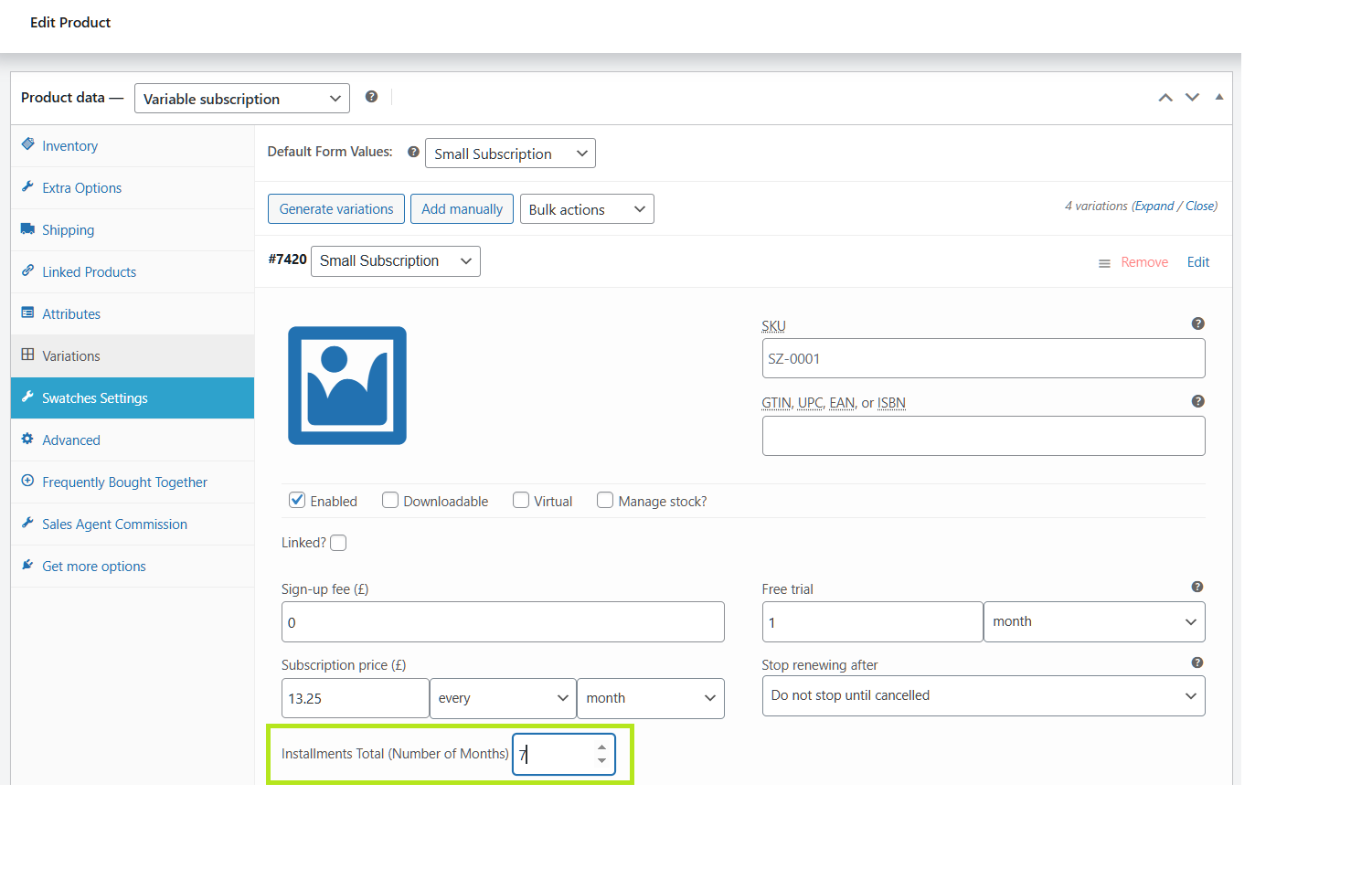
For Variable Products:
- Edit any variation within your variable product.
- You will see the same field under each variation section: Installments Total (Number of Months).
- Enter the number of instalments for that variation.
Step 2: Review Orders
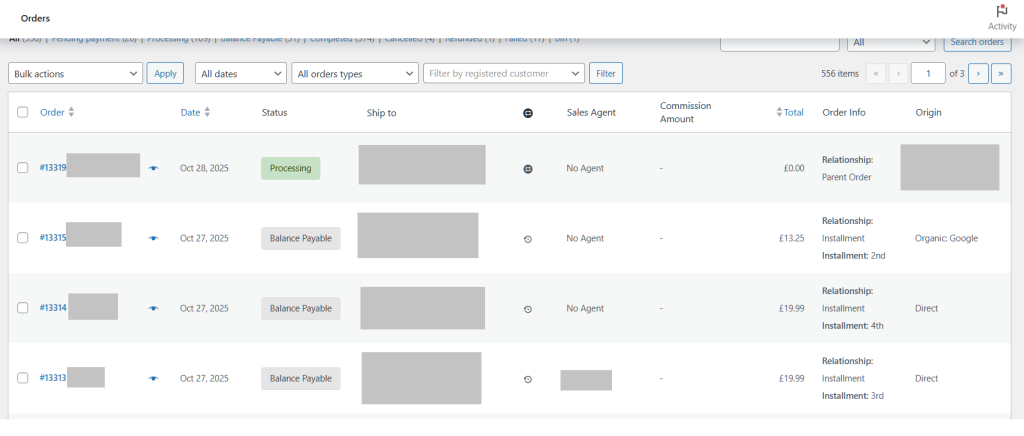
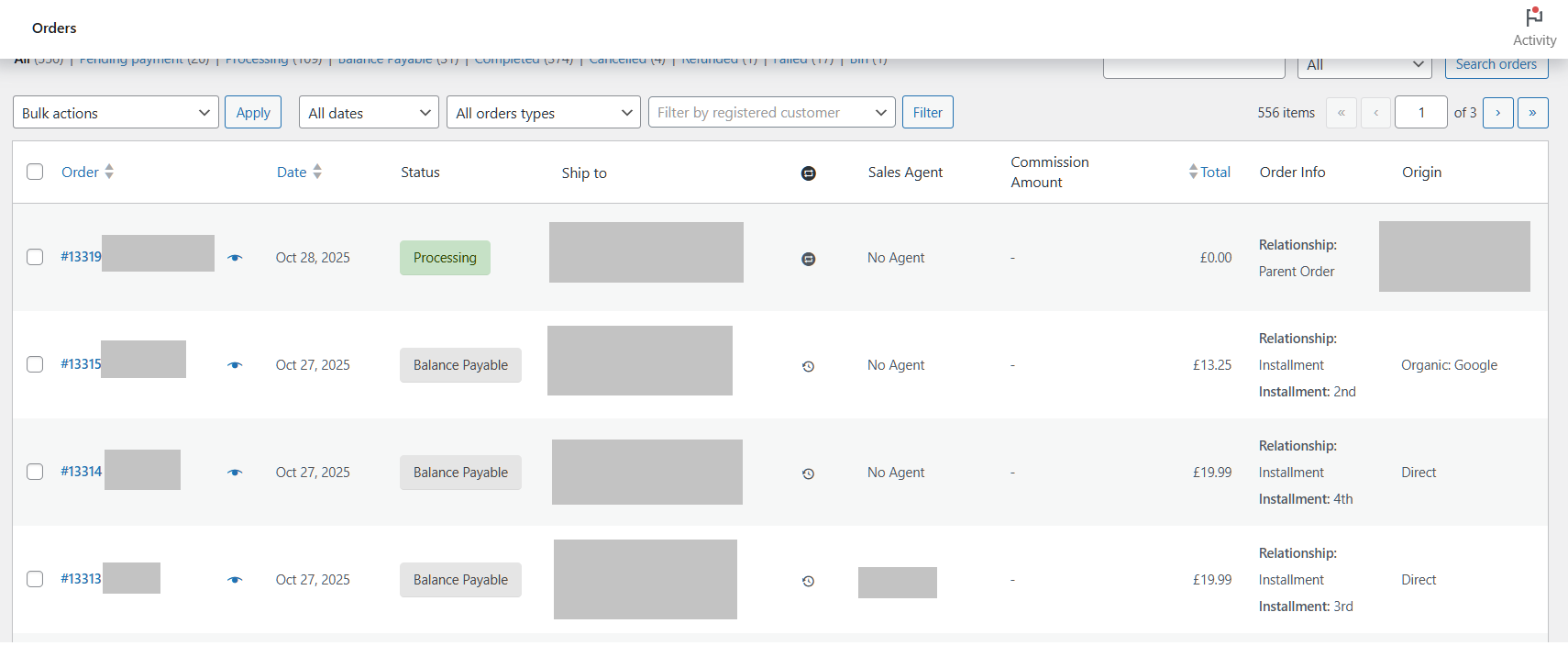
After a customer purchases a subscription product and renewals begin, you will notice a new column in your WooCommerce → Orders page called Order Info.
This column displays:
- Parent Order: The first order in the instalment cycle that triggers shipping
- Installment Orders: Subsequent payments marked as Balance Payable with no shipping required
Why This Plugin Works Better Than Heavy Alternatives
Unlike large commercial plugins, this custom-built solution is lightweight and integrates directly with WooCommerce Subscriptions core actions. It avoids unnecessary features, reduces performance overhead, and keeps your site clean.
- Is lightweight and purpose-built for WooCommerce Subscriptions
- Does not add unnecessary features or complexity
- Works directly with WooCommerce Subscriptions core actions
- Keeps order tracking transparent and easy to follow
- Avoids performance issues caused by multiple overlapping payment systems
This makes it perfect for developers and store owners who want reliable instalment-based subscriptions without relying on third-party bulk plugins.
Final Thoughts
If you are struggling to configure WooCommerce Subscriptions for instalment payments, this plugin provides a practical and cost-effective solution. It gives you complete control over the instalment cycle, shipping logic and order tracking without compromising performance or flexibility.
Download the plugin and follow the installation steps above to start managing WooCommerce subscription instalments effortlessly.